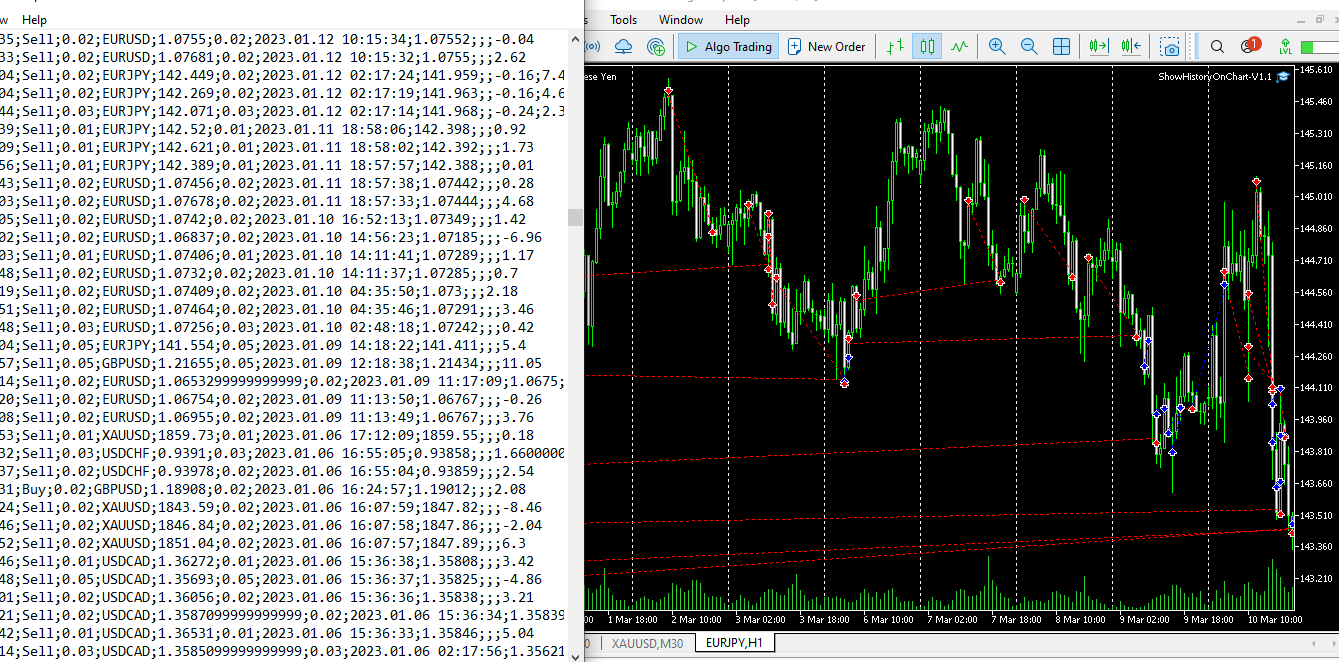
- Get trade history files (.csv) and put it in ..\MQL5\File folder and save the name of file (.csv).
- For time differences of broker's terminals, use the same broker's meta trader 5 to get the best results.
- Run the expert adviser on each charts and put the name of the file (filename.csv) in input field of expert adviser.
- For buy signals, blue arrows and trend lines are used. For sell signals, red arrows and trend lines are used.
- Remove the expert, and all the objects (arrows and trend lines) are gone.
- This EA was tested on forex and gold charts. on charts. ")
#43837ExpertsMetaTrader 5👁 9865 views
Display trade history on charts (MT5)
M
Author
ManiABLSPublished date
Apr 14, 2023
📚Related Articles
← View other articles →#77538Experts
One-Click Trade Manager — risk-based lot size with entry, stop and target in one click
Most manual trading mistakes are arithmetic, not analysis. You size the lot in your head, the stop ends up wider than you meant, and a 1% trade quietly becomes a 4% one. This panel...
Amul RavikumarView detail →
#77535Experts
RegimeRouter — trend/range classifier with a per-regime win rate ledger
RegimeRouter — trend/range classifier with a per regime win rate ledger The problem A trend following rule loses money in a range. A mean reversion rule gets destroyed in a trend. ...
Ali AkbarView detail →
#77386Experts
Smart Loss Exit — early exit for losing positions (ATR adverse excursion, time in trade, EMA invalidation, RSI, money cap) with a CSV journal
Smart Loss Exit is not a trading strategy. It never opens a position. Attach it to one chart and it watches the positions you point it at — manual trades or another EA's, filtered ...
Amul RavikumarView detail →