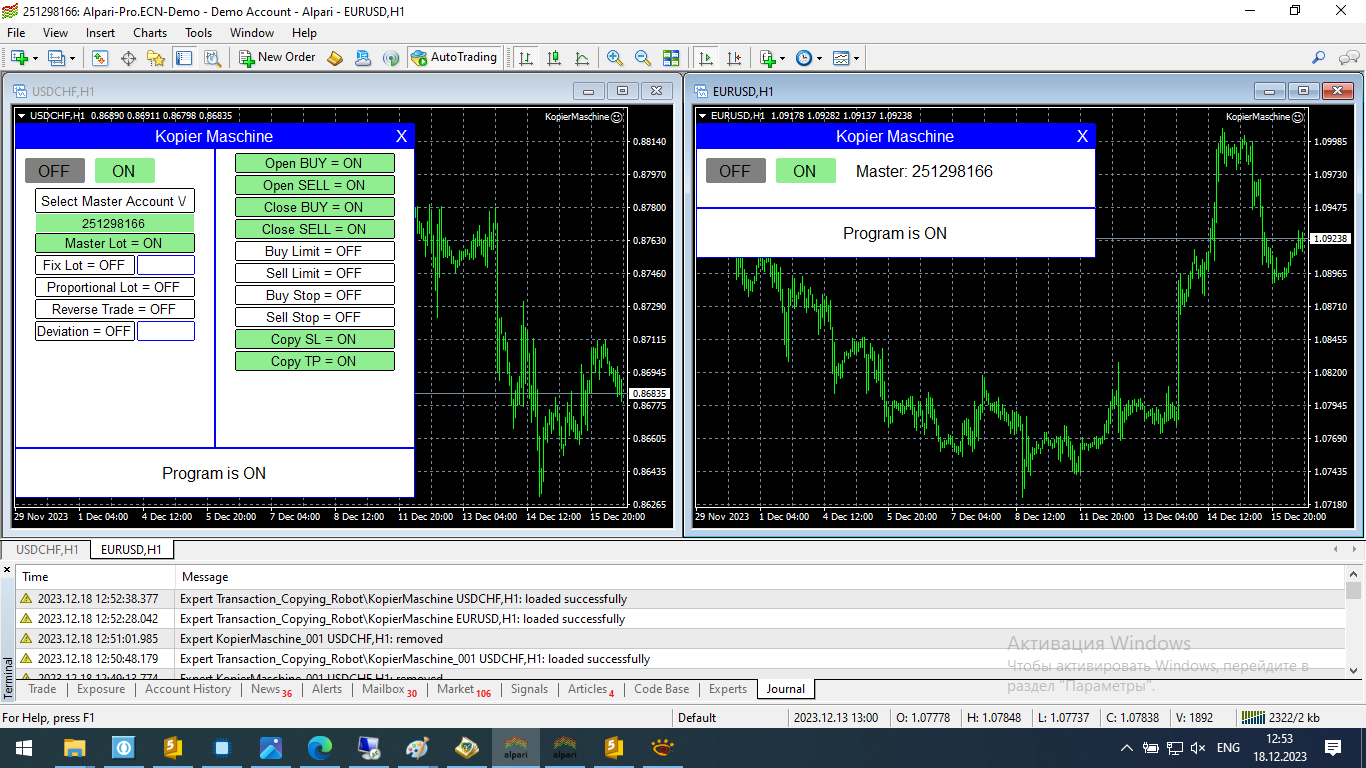
Features
- The programme works in two modes Master and Slave
- You can copy trades from different vendors to one slave account.
- Stop Loss and Take Profit copying can be enabled/disabled.
- Copying of pending orders can beenabled/disabled
- Conflict-free operation in the presence of other Expert Advisors
- Support for accounts with suffixes and prefixes
- You can change the trading direction
- Trades can be copied with volume proportional to the balance, fixed volume and with the supplier's volume.
- You can set a condition: open a trade when the price on a subordinate account deviates from the supplier's price by a specified value.
Working principle
The terminal with the supplier's account and the terminal with the slave account must be opened simultaneously.
On the terminal with the supplier account the Expert Advisor is set in the WorkMode=Master mode, then the ON button on the panel is pressed.
On the terminal with a subordinate account the Expert Advisor is set in the WorkMode=Slave mode, then the Provider's account is selected on the panel, the necessary options for copying trades are selected and the ON button is pressed.
After performing the above actions, trades from the Provider account will be copied to the subordinate account